Student ID card maker with eight ready designs
Choose a design, pick the batches, and ClassTotal fills in every card from your student list — photo, name, batch, blood group and a QR code. Print them or save them as a PDF or images.
Free for up to 100 students · No credit card · Made in India
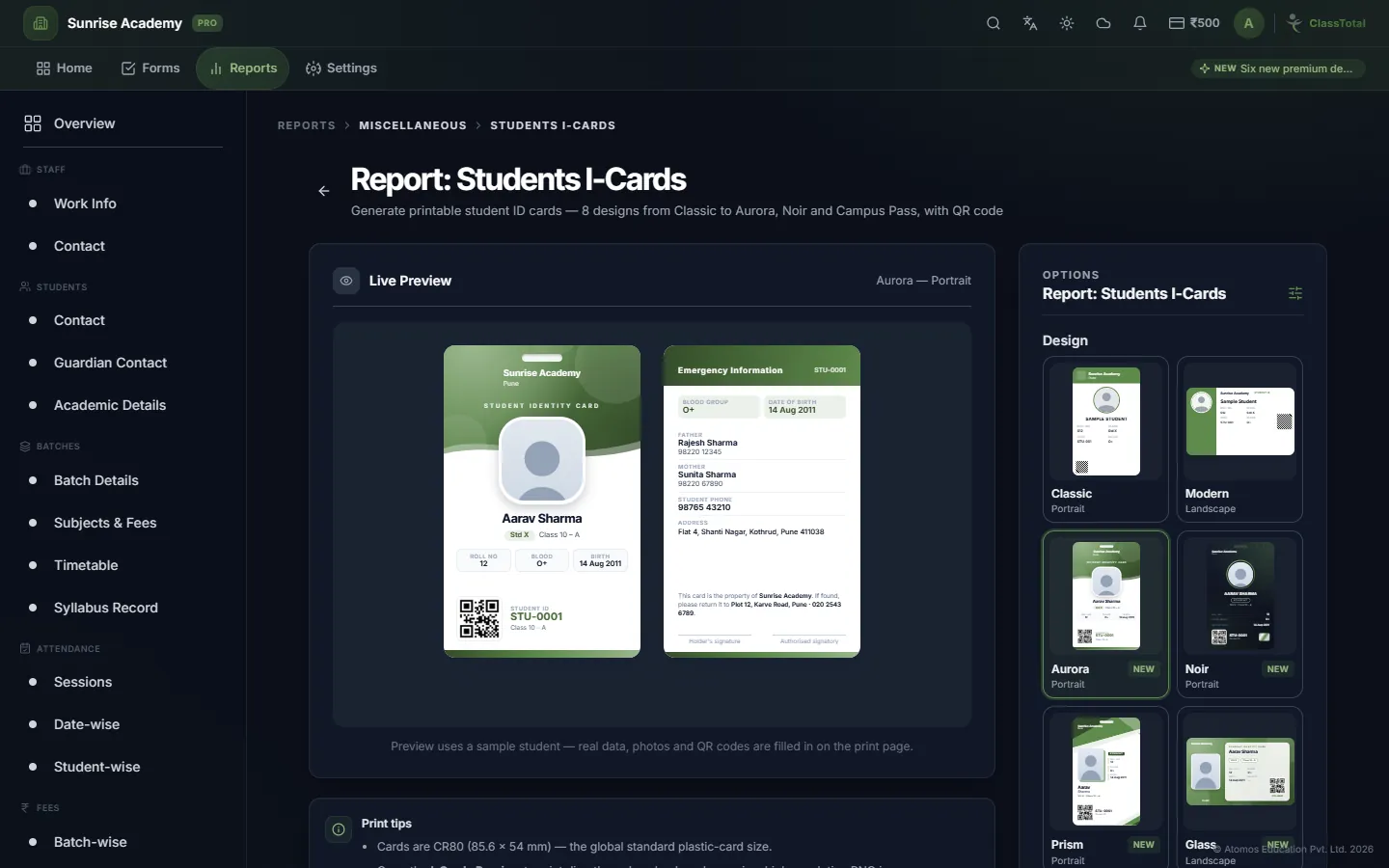
ID cards without a designer
Cards are the standard 85.6 × 54 mm size used by plastic-card printers.
Eight designs
Classic and Modern, plus six premium designs: Aurora, Noir, Prism, Glass, Metro and Campus Pass.
Your colour and logo
Cards use your institute's logo and name, in the accent colour you choose.
QR code on every card
Each card carries the student's code as a QR code, which ClassTotal can scan to open the student.
Front and back
Add a back side with parents' contacts, address and signature lines.
Whole batches at once
Select one batch, several batches or particular students, and make all their cards together.
Print, PDF or images
Print straight from the browser, save as a PDF, or download every card as an image in one ZIP file.
One card for attendance, fees and the library
Use NFC cards and the same ID becomes the student's attendance tap, and opens their record at the fee desk and the library counter.
- Details come from the student profile — no retyping
- Validity date printed on every card
- Works with ordinary printers and plastic-card printers
- NFC cards can mark attendance with a tap
- Live preview before you print
- Available on Pro, Pro Max and Ultra Pro Max plans
Three steps
Choose a design
Pick one of eight designs and your accent colour.
Select students
Choose batches or individual students and the validity date.
Print or download
Print, save as PDF, or download the cards as images.
Student ID Card Maker questions
Which plans include student ID cards?
Student ID cards are included in the Pro, Pro Max and Ultra Pro Max plans. The Free plan does not include them.
What size are the cards?
The standard ID card size, 85.6 × 54 mm, used by plastic-card printers and card holders.
Can I print on a normal printer?
Yes. You can print from the browser on ordinary paper or card, or send the PDF or images to a print shop.
What does the QR code do?
It holds the student's code. Scanning it in ClassTotal finds the student, for example when issuing a library book.
More of ClassTotal
Try it with your own institute — free
Sign up in about a minute. Free for up to 100 students, with no card to enter.
Sign Up FreeExplore the full feature list or compare plans & pricing.